Displays
Blocks that show something in the world with display entities: a signal level as a bar, an item floating above its block, a name or a number in glowing tube-style text.
Getting them
| Block | Looks like | Recipe |
|---|---|---|
| Gauge Bar | polished blackstone | 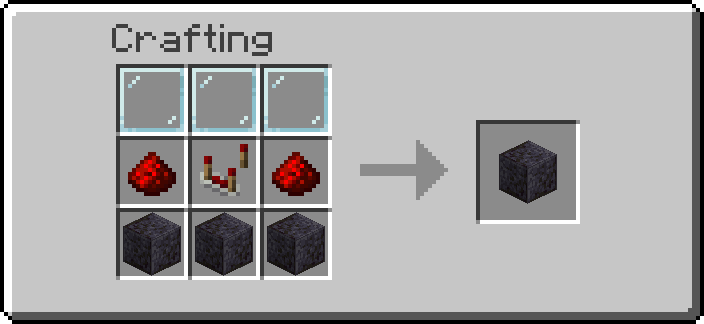 |
| Item Hologram | barrel, lid up | 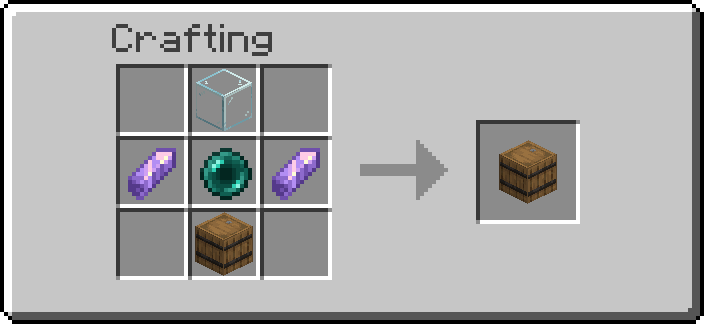 |
| Text Screen | barrel, a dark screen on its lid | 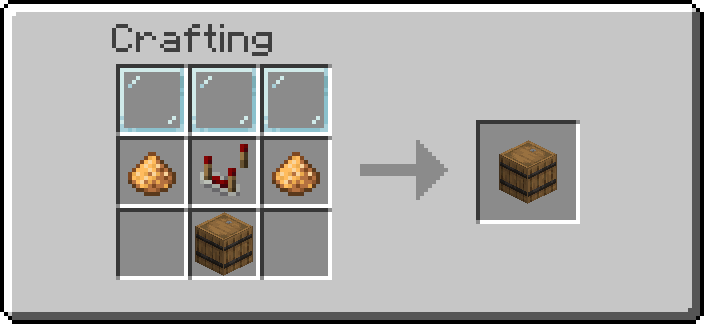 |
Operators: /function ra_displays:items/give_all.
Configuring a display
Every display block has the same settings, changed with the Data Handler; the Wrench (Shift+right-click) cycles the ones that are a choice. A Wrench change shows at once, a Data Handler change within a second.
| Property | Values | Default |
|---|---|---|
facing |
down, up, north, south, west, east: the face the display is drawn on (or, for the Item Hologram, floats out of). A barrel's lid turns with it, contents kept. In the Data Handler, one button per face |
the face looking at you when placed (Item Hologram: up) |
direction |
how the display is turned on that face; see each block below | |
color |
see each block below; anything else draws the default | |
offset |
a position (x, y, z), each -16 to 16 in sixteenths of a block: right, up, and out of the face, as you look at it. In the Data Handler, [Edit] nudges it by 1/16, 1/4 or a whole block, or types an axis | 0, 0, 0 |
scale |
25 to 400 (percent), about the middle of the face; admins up to 1600 | 100 |
rotation |
a tilt, yaw -180 to 180 and pitch -90 to 90 degrees, from straight out of the face: yaw turns it clockwise seen from its top, a positive pitch tips its front down. The text (the Text Screen's screen stays flat on the block) or the hologram's item turns about its own middle; the hologram's name stays upright above it. In the Data Handler, [Edit] nudges it by 1, 15 or 45 degrees, or types an angle | 0, 0 |
background |
the colour behind the text (Text Screen, Gauge Bar, the hologram's name): none, one of the sixteen chat colours with an opacity, or typed as #AARRGGBB. None shows only the block's face behind the text. Only #00000000 is none: a colour typed with opacity 00, such as #00FF0000, is kept as typed (and draws nothing) |
none |
The scale a new display gets is on the Displays settings page (Gauge Bar scale and the others).
Gauge Bar
A bar on the front of the block, filled to the redstone level feeding it: empty at 0, full at 15.
It is fifteen glowing segments, one per level, drawn as text like the Text Screen: the lit ones in
the fill colour, the others in the track colour, with nothing behind them unless you give it a background.
- Place it: the bar is drawn on the face looking at you (it can face up or down too).
- Feed it redstone from any side. The strongest level wins; a repeater or comparator pointing into it fills it completely. Dust carries its real level: to show how full a chest is, put one dust between the comparator reading it and the Gauge Bar.
- Shift+right-click with the Wrench to change the facing, the direction or a colour.
| Property | Values | Default |
|---|---|---|
direction |
which way it fills: right (from the left edge), left, up (from the bottom), down |
right |
color |
the lit segments: a colour name (red, gold, green, aqua... the sixteen chat colours) or #RRGGBB |
red |
track_color |
the unlit segments, the same colours | dark_gray |
The Goggles show the level, the facing, the direction and the colour.
Crafted from three glass panes, two redstone, a comparator and three polished blackstone.
Item Hologram
A barrel that shows the item inside it floating half a block above its lid, turning slowly, with the item's name over it.
- Place it and put an item in (by hand, a hopper, an Item Pipe...). The first item in the barrel is the one shown; how many there are does not matter.
- Take it out, or put another one first, and the hologram follows within a second.
- A renamed item shows its anvil name; any other its usual name, in your language.
| Property | Values | Default |
|---|---|---|
spin |
the item turns (a full turn every 4 seconds) | on |
show_name |
the item's name floats above it | on |
direction |
where a still item (spin off) faces: front (out of the face), right, back, left |
front |
color |
the name's colour: a colour name (white, gold, aqua, light_purple... the sixteen chat colours) or #RRGGBB. A renamed item's own colour wins |
white |
Floating out of a side, the item is a block out from that face with its name above it, and the name faces out; over the top or under the bottom, the name turns to whoever looks.
Shift+right-click with the Wrench to turn the spin or the name off, or change the rest. The display is the same for everyone looking at it, so these belong to the block, not to each player. Breaking it spills the barrel's contents as any barrel does.
Crafted from a glass block, two amethyst shards, an ender pearl and a barrel.
Text Screen
A barrel with a dark screen on its lid, showing one line of glowing amber text like a nixie tube. The redstone level feeding it picks what it shows:
| Level | Shows |
|---|---|
| 15 | the name of the item in the barrel's first slot |
| 14 | the second slot |
| ... | ... |
| 1 | the fifteenth slot |
| 0, or the chosen slot empty | nothing: the tube is dark |
| any, barrel empty | the level itself, 0 to 15, in large digits |
- Place it: the screen is on the face looking at you (it can face up or down too).
- Put items in its first fifteen slots, one per name to show: a renamed item shows its anvil name, any other its usual name, in your language. Long names wrap onto a second line.
- Feed it redstone from any side. The strongest level wins; a repeater or comparator pointing into it reads as 15. A dust line from a Sequencer, a Signal Calculator or a comparator turns it into a small message board.
The screen changes as soon as the level does; a change to the barrel's contents shows within a second. Breaking it spills the barrel's contents as any barrel does. The Goggles show the level, the facing, the direction and the colour.
| Property | Values | Default |
|---|---|---|
direction |
where the top of the text points: up, left, down, right |
up |
color |
a colour name (gold, aqua, white... the sixteen chat colours) or #RRGGBB. A renamed item's own colour wins |
#FF8C1A (amber) |
Crafted from three glass panes, two glowstone dust, a comparator and a barrel.
Advanced
- Every display is a
block_display,item_displayortext_displaystanding on the block's marker, taggedraandra.display, and moved where it is drawn by its transformation. Breaking the block removes them; so do the uninstall and the admin purge. - Displays are fully lit (
brightness15): they stand inside the block, where the light is 0. - Configuration (
ra/modules/displays/DisplayConfig.kt): the facing (adirectionproperty) is each display's entity Rotation; direction, offset and scale are its transformation, computed by one generated helper (<block>/form/<part>) in fixed point with scoreboard operations, no macro. The rotation (afacingproperty, yaw and pitch) is the tilted parts'right_rotation: a quaternion built from a sine table written at load (storage ra:displays trig, one entry per degree,DisplayTilt.kt), read by one macro whose arguments are the two clamped integer angles. A text turns about the middle of its line: its translation is corrected by the same table. The background (acolorproperty, ARGB) is copied into the text display'sbackgroundthrough a score. A block redraws (<block>/restyle) on placement, from the Wrench, and from the slow clock whendata.propertiesdiffers fromdata.data.style. Missing properties (a block placed by an earlier build) get their defaults then; until then a missingrotationreads as no tilt and a missingbackgroundas none. A Gauge Bar placed by an earlier 6.0.3 build with the oldbackground:1bflag reads it as the colour 1, which is transparent: its dark plate is gone from its next redraw, as text displays have no backdrop by default. Text colours are checked (ra_displays:text_color/check) and copied, never pasted into a command. - One slow clock,
ra_displays:poll/run, runs once a second while a display block that needs it is loaded, and stops when none is. It puts back a display killed by hand. - Gauge Bar: marker tag
ra.custom_block.gauge_bar, onetext_displaytaggedra.displays.gauge_bar: fifteen█glyphs, the first L colouredcolor, the resttrack_color(both checked byra_displays:text_color/check), one of sixteen fixed texts picked by score, no macro. The input is read every tick (each side askedany_sidefirst, as the gates do); the text is rewritten only when the level changes. A Gauge Bar drawn by an earlier 6.0.3 build (two block displays,ra.displays.gauge_track/ra.displays.gauge_fill) has no text display, so the slow clock redraws it and the old parts are removed. The last level drawn is the marker'sra.powerscore;data.status.levelholds it for the Goggles. - Item Hologram: marker tag
ra.custom_block.item_hologram, displaysra.displays.holo_itemandra.displays.holo_name. Nothing runs per tick: once a second it comparesItems[0](without slot and count) withdata.data.shownand redraws only on a difference. The spin is the client's: each second sets the next 90-degree step with a 20-tick interpolation. The name is copied as a component (custom_name, elseitem_name), or a translation built from the item id (ra_displays:item_name/build, shared with the Text Screen). - Text Screen: marker tag
ra.custom_block.text_screen, displayra.displays.screen_text(a text display, no panel behind it). The input is read every tick like the Gauge Bar's, the last level inra.power(data.status.levelfor the Goggles). What it would show ({item:...}without slot and count,{level:L}, or{}) is built when the level changes and once a second on the slow clock, and compared withdata.data.shown: the text is only rewritten on a difference.