Tools
Five items. Each one does exactly one job, and they do not overlap — the split matters, because for a while two of them could both change a block and there was no rule about which owned what.
| Tool | Item | Job | Recipe |
|---|---|---|---|
| Wrench | blaze_rod, orange dye model |
The only tool that changes a block | 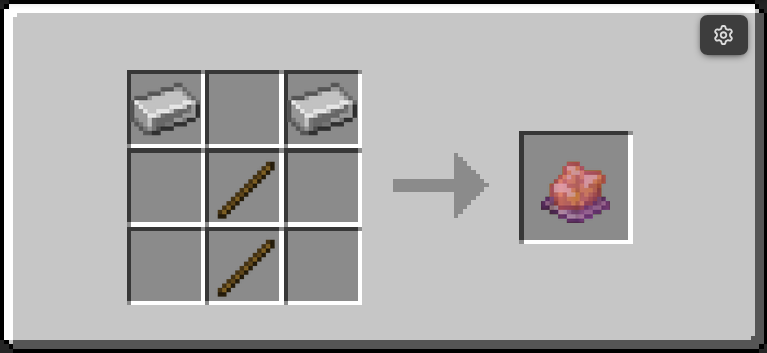 |
| Goggles | leather_helmet, dyed orange |
Reads every block in range, continuously | 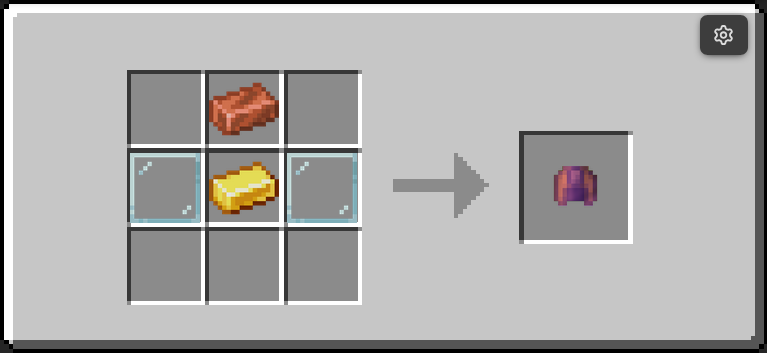 |
| Data Handler | blaze_rod, light blue dye model |
Edits one block's properties in detail | 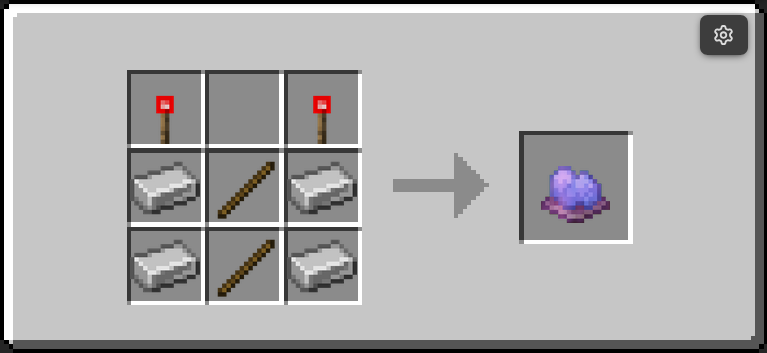 |
| Clipboard | paper |
Copies one block's settings onto others | 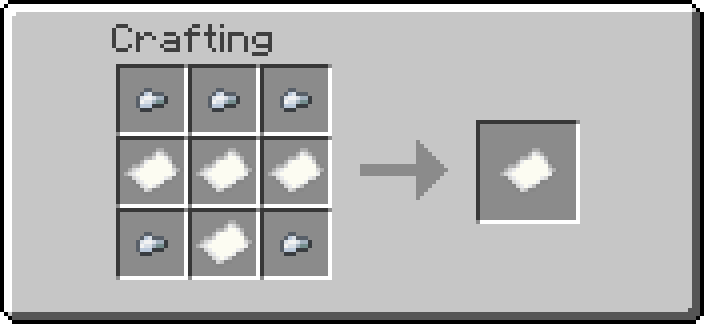 |
| Multimeter | clock |
Reads a network's numbers into chat | 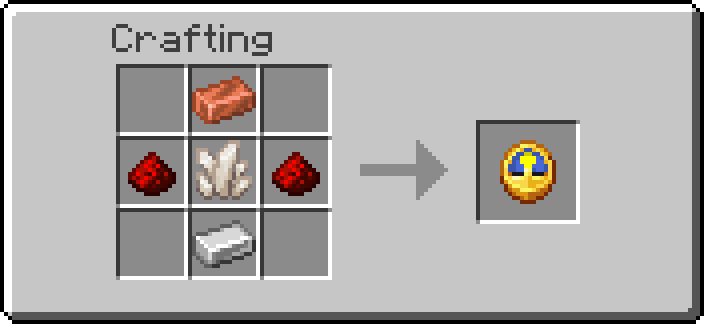 |
Wrench
Shift+RMB a block to cycle its settings.
What happens depends on how many settings the block has:
- None — it says so.
- One — it cycles immediately. A menu with one button is a worse button.
- Two or more — it opens a menu listing each setting, its current value, and a
[ CYCLE ]button.
── electric_furnace ──
  Output: [under]   [ CYCLE ]
  Power: [low]      [ CYCLE ]
The menu stays open across clicks, so you can step several settings without re-aiming. It remembers which block you opened it on, so turning away mid-click does not retarget it — and if the block is broken while the menu is up, the button says so instead of doing something silently wrong.
Plain RMB toggles the two blocks with a single on/off state worth reaching for — the Wireless Emitter and Receiver — and attempts multiblock assembly on a base block.
What the wrench will not offer
Some properties are the block's own working numbers rather than settings: a
generator's generation_rate, a valve's rate, a Block Breaker's cooldown.
The block writes them and depends on them being sane, so the wrench never lists
them and the Data Handler shows them locked. See
Read-only properties for the one place
that is declared.
Blocks with a wrench menu today: Liquid Drain (mode, rate), Electric Furnace (output face, power mode), EU Consumer (rate), Creative Fluid Source (medium), Uni Gate (gate type), and the three Ender vaults (mode).
Goggles
Wear them or hold them. Every block within 16 blocks grows a billboard showing its name and live status, refreshed once a second.
The goggles only read. They used to have a "tinker" action on sneak+RMB that cycled modes and toggled blocks, which meant two tools could both change things — the Electric Furnace ended up with its output on the wrench and its power mode on the goggles, and a wrench message addressed to a tag only the goggles ever set. That action is gone. If you want to change something, use the wrench.
A value the block has not computed yet renders N/A in red rather than
disappearing, so a blank readout is visible rather than silent.
Data Handler
Shift+RMB a block to open a property editor in chat. Numbers and text are
entered through a book, so there is no need to type raw /data commands.
Properties the block owns show their value with a struck-through red [Modify]
and a reason on hover. They are shown rather than hidden on purpose: a value the
goggles already display is more confusing absent than present-but-locked.
There is also a Creative Data Handler, which edits anything including the locked fields, adds and removes properties, and views a block's raw internal data. That one is for building the pack, not for playing with it.
Tools do not stack. Each one is max_stack_size=1, so a second wrench sits
in its own slot rather than merging with the first. They carry per-tool state —
the Clipboard's origin, the Remote's channel — and two of them in one slot is a
stack whose state belongs to whichever was picked up last. The bundles still hold
the whole set, because bundle_contents set by a command is not subject to the
weight limit that applies when a player inserts items by hand.
Item properties and [Set from hand]
A property that holds an item id — the Item Pipe's filter_item is the one
you will meet — gets a second button, [Set from hand]. Hold the item and
press it, and the id of what you are holding is written straight in.
The row still has its ordinary [Modify] button for typing an id out, which is
what you want when your hands are full or the item is somewhere else. But nobody
should have to remember how to spell minecraft:polished_blackstone_slab to
configure a sorter, which is the whole reason the type exists.
Which properties are item ids is declared in the Handler's registry, not guessed from the value: an item id is a string as far as storage is concerned, so a property left to probe itself would come out as plain text and lose the button.
Clipboard
Copies settings from one block to others of the same kind.
- Shift+RMB a block — it becomes the origin.
- Shift+RMB other blocks of the same kind — each one is matched to the origin.
- Shift+RMB at nothing — clears the origin.
Everything is shift+RMB because most configurable blocks are backed by a container, and a plain click opens their GUI.
Same-kind only, deliberately. Half the pack has a property called mode, and a
Gas Valve's rate landing on a Randomizer's chance would quietly mean something
else. Only data.properties travels — a block's private working state stays put.
Multimeter
RMB a block to read its network in chat: which grid it belongs to, what the grid stores, its capacity, what this block contributes, and what it draws or makes.
On a run holding more than one medium it lists every medium with its own
amount, which is the one place in the pack that shows the breakdown — the Goggles
only have room to say Multimedium. See
Reading a mixed run.
Useful for the questions the goggles cannot answer at a glance — why a grid is full, which of two adjacent runs a block actually joined, or what is really in a pipe that says it is mixed. The network number it prints is stable, so two blocks you believe are connected reporting different numbers is the whole diagnosis.
Getting them
All five are craftable. /function ra:give_all_items hands out everything in the
pack, and each tool has its own give function
(ra:tools/wrench/give, ra:tools/clipboard/give, and so on) if you want just
one.