Storage
The ra_storage module adds Boxer, Unboxer, and Item Crate workflows for compact inventory transport.
- Namespace:
ra_storage - Give all:
/function ra_storage:items/give_all - Give crate only:
/function ra_storage:items/give_storage_box - Runtime architecture: How It Works
Block Summary
| Block | Item model | Recipe | Default I/O |
|---|---|---|---|
| Boxer | minecraft:dropper |
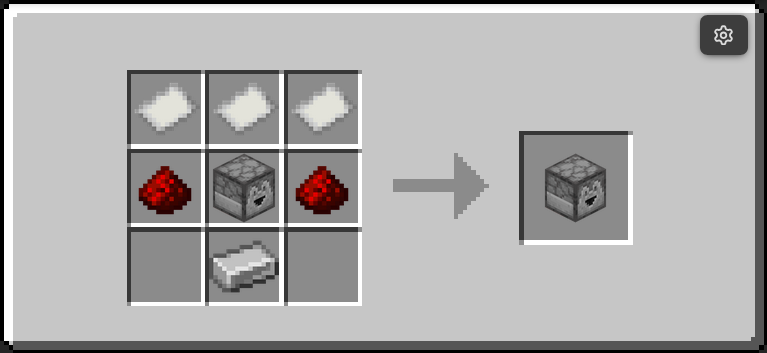 |
input1="^ ^ ^-1", output1="^ ^ ^1" |
| Unboxer | minecraft:dispenser |
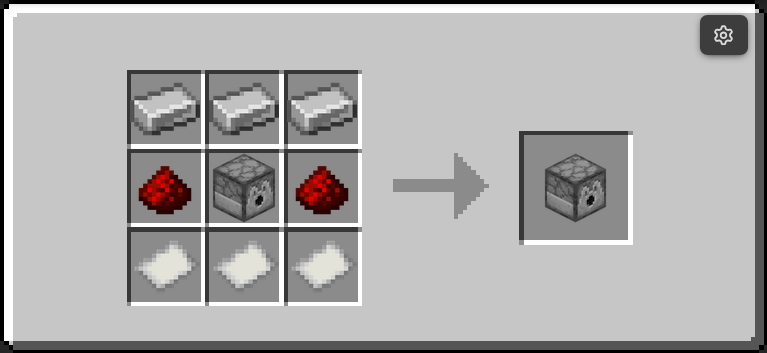 |
input1="^ ^ ^-1", output1="^ ^ ^1" |
Item Crates
Item Crates are storage items and can also be given directly. There is no recipe for one — they are made by a Boxer and emptied by an Unboxer.
- Base item:
minecraft:command_block, rendered as a head viaitem_model="minecraft:player_head"with profileBoxMan01234 - The base is a command block so the crate cannot be placed. A crate carries
its contents in
custom_data, and placing it as a block would drop that silently, destroying everything inside. Command blocks useGameMasterBlockItem, whose placement check requires creative mode and permission level 2, so a survival player cannot place one at all. - Stack size:
64 - Storage payload keys:
components.minecraft:custom_data.ra.storage_box.itemscomponents.minecraft:custom_data.ra.storage_box.preview- Marker key for modern crates:
components.minecraft:custom_data.ra.item_box - Lore displays the first five preview lines; if more exist, lore appends
... and more
Two-Minute Setup
- Place a Boxer and point its front toward an output container.
- Put the source container behind the Boxer (default
input1) and ensure output has free space. - Power the Boxer. It packs the full input container into one Item Crate and inserts that crate into
output1. - Place an Unboxer facing an output container.
- Put one or more Item Crates inside the Unboxer itself (it is a barrel — open it and drop them in).
- Power the Unboxer. It empties each crate completely into
output1and consumes the crate.
Runtime Behavior
Boxer
- Runs while powered.
- Requires both
input1andoutput1to be valid#ra_lib:containers. - Copies the full
Itemslist frominput1into one Item Crate (ra.storage_box.items). - Builds a preview list and refreshes crate lore.
- Inserts the generated crate into
output1using shared item-mover capacity checks. - Clears input container contents only after successful insertion.
- Enforces a hopper-like minimum 4 tick cooldown between successful operations.
Unboxer
- Runs while powered.
- Selects one candidate crate from
input1, which defaults to the Unboxer's own inventory. - Accepts both modern crates (
ra.item_box) and legacy crates (ra.storage_box_item). - Empties the crate completely in one activation, taking each stored stack out before delivering it.
- If
output1cannot hold a stack, the remainder is dropped as an item rather than destroyed. - Destroys the spent crate, which also clears the way for the next one in the container.
- Enforces a hopper-like minimum 4 tick cooldown between successful operations.
Command Quick Reference
| Command | Purpose |
|---|---|
/function ra_storage:items/give_all |
Give Boxer, Unboxer, and Item Crate |
/function ra_storage:items/give_storage_box |
Give one empty Item Crate |
/function ra:items/bundles/give_storage_bundle |
Give a prefilled storage bundle |
Troubleshooting
- Boxer or Unboxer does nothing: verify it is powered and that
input1/output1point to valid containers. - Boxer does not clear input: output likely cannot accept another item (full container).
- Unboxer does nothing: ensure the selected input item is an Item Crate with at least one stored stack.
- Items on the floor near the Unboxer: the output was full. Contents are dropped rather than deleted.
Changed in v5.1.4
The Unboxer is now a barrel, not a dispenser. It holds the crates it is unboxing in its own inventory, and a vanilla dispenser fires its own contents on any rising redstone edge — which is what threw crates on the floor part-way through. A barrel has the same inventory and GUI and cannot dispense. Redstone control is unchanged: power it to run.
Contributor Notes
- Keep modern (
ra.item_box) and legacy (ra.storage_box_item) crate compatibility paths intact. - Take from the crate before inserting, and deliver with
ra_lib:inventory/insert_or_drop. Inserting first and consuming afterwards duplicates items; a plainloot insertdestroys the overflow. - If lore or preview format changes, update both
update_loreandupdate_lore_storage_target.