Wireless Redstone
The ra_wireless module links emitters, receivers, and the handheld remote through channel strings.
- Namespace:
ra_wireless - Give all:
/function ra_wireless:items/give_all - Runtime architecture: How It Works
Crafting Overview
| Item | Recipe preview | Runtime role |
|---|---|---|
| Wireless Emitter | 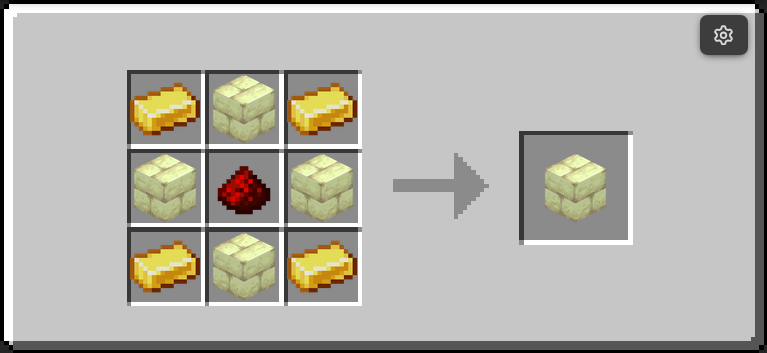 |
Sends signal while powered |
| Wireless Receiver | 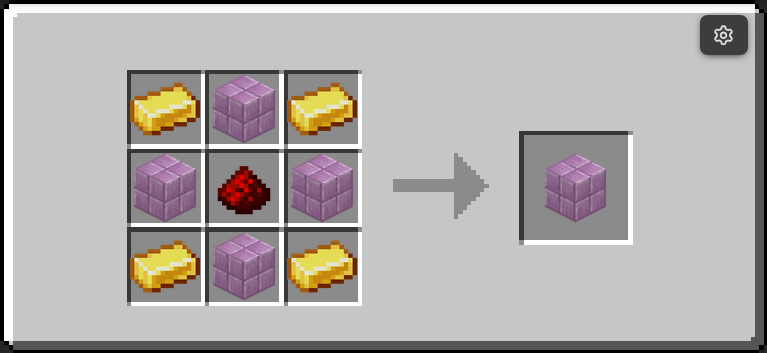 |
Outputs redstone when matching emitter is active |
| Redstone Remote | 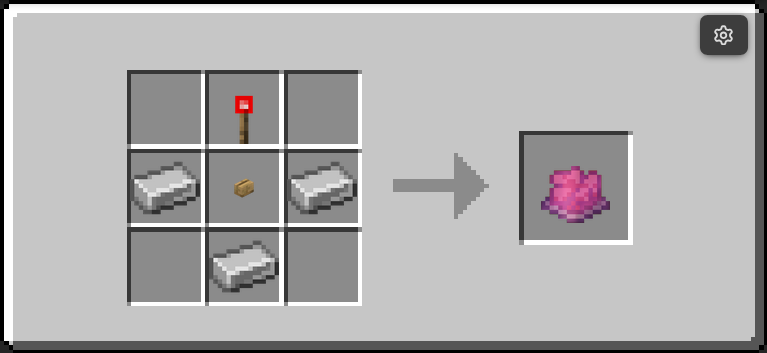 |
Pulses matching receivers from your hand |
Two-Minute Setup
- Place one Emitter and one Receiver.
- Set both to the same channel string (for example
main). - Power the Emitter with redstone.
- Receiver outputs while a matching Emitter is transmitting.
- Optionally use the Remote for short wireless pulses.
Channel Model
Channels are string identifiers (default is "default"). Matching uses exact string equality.
Setting the Remote's channel
Sneak and right-click with the Remote. An Input Form book appears: write the channel on page 1 and close the book. Drop the book to cancel.
This needs no command permissions, so it works on a survival server. Before
v5.1.4 the menu suggested a /function command, which a player without cheats
could not run — the Remote was stuck on default forever.
The Remote's lore does not show its current channel. Lore is baked into an item and cannot read that item's own data, so keeping it in step would mean rebuilding the item from the player's typed text, which is not safe to do. The channel is reported in chat on every pulse and when the prompt opens.
- Emitter property:
data.properties.channel - Receiver property:
data.properties.channel - Remote item channel:
SelectedItem.components.minecraft:custom_data.ra.channel
Command Quick Reference
| Command | Purpose |
|---|---|
/function ra_wireless:items/give_all |
Give emitter, receiver, and remote |
/function ra_wireless:tools/remote/give |
Give remote only |
| Sneak + right-click with the Remote | Set its channel (opens a writable book) |
Runtime Behavior
Wireless Emitter
- Runs
ra_lib:redstone/detectand reads aggregate power fromra.power. - If
enabled=1band powered, addsra.transmitting. - If unpowered, removes
ra.transmitting.
Wireless Receiver
- If disabled, output is forced off.
- If tagged
ra.pulsing, output stays on whilera.pulse_timercounts down. - If not pulsing, it scans transmitters for exact channel match.
- Output shell turns on only when a valid source exists.
Redstone Remote
- Right-click: pulse matching receivers.
- Sneak + right-click: opens the Input Form book to set the channel. Drop the book to cancel.
- Pulse length: 4 ticks (
ra.pulsing+ra.pulse_timer).
Troubleshooting
- Receiver does not output: verify emitter and receiver channel strings are identical.
- Remote does nothing: verify remote channel matches receiver channel exactly.
- Constant output when not expected: check whether any emitter on that channel is still powered.
Contributor Notes
- Channels are strings, not numeric IDs.
- Keep emitter and receiver channel comparisons exact.
- Channel UX changes must update both block properties and remote item custom data logic.