Automation
Blocks and items that run vanilla machines for you. The Crafter Controller fires a vanilla crafter on its own once the crafter holds the ingredients its Pattern asks for, and with a chest on its other side it fills the crafter itself. The Uncrafter takes items back apart into their ingredients for EU, the Experience Absorber collects experience orbs into a fluid network as liquid experience, and the Item Pipe Splitter shares a stream of items out between several containers. The Conveyor carries items, mobs and players along.
Getting them
| Item | Looks like | Recipe |
|---|---|---|
| Crafter Controller | target block | 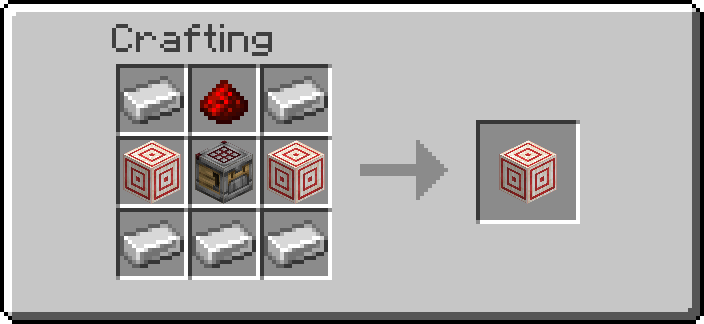 |
| Pattern | flow banner pattern | 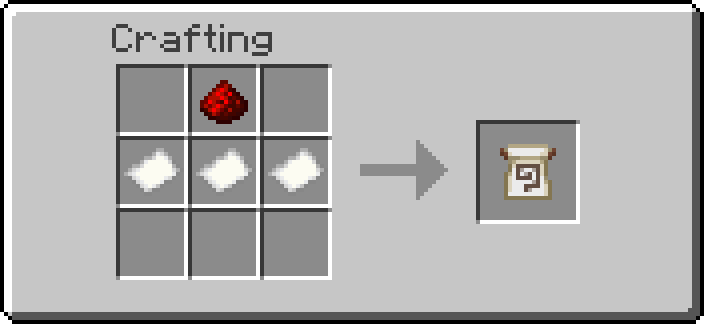 |
| Uncrafter | grindstone | 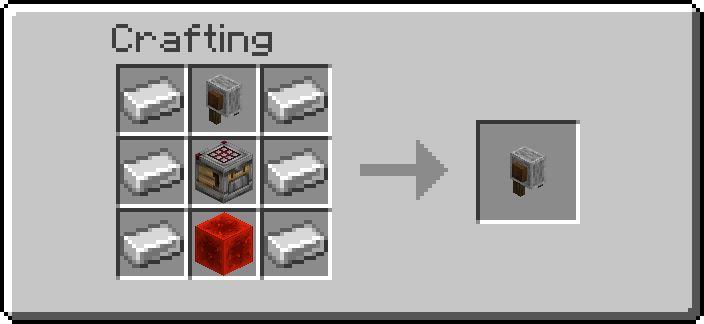 |
| Experience Absorber | verdant froglight | 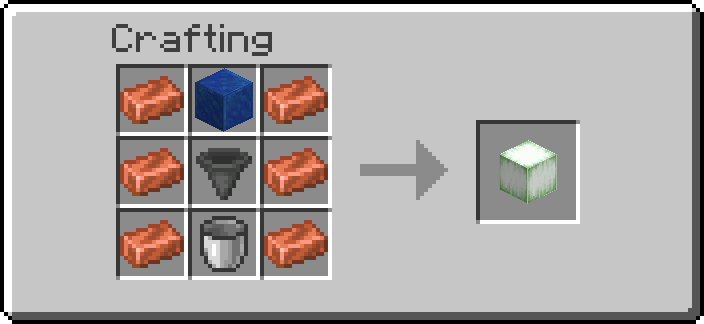 |
| Item Pipe Splitter | dispenser facing up, like an Item Pipe | 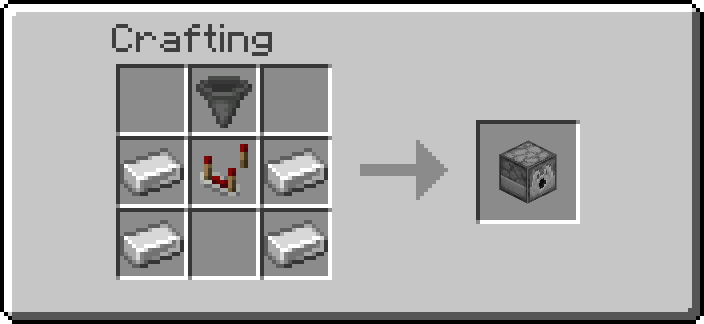 |
| Conveyor | smooth stone slab with a magenta arrow | 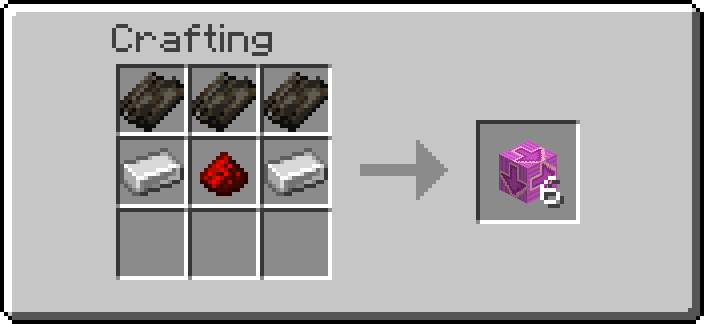 |
Operators: /function ra_automation:items/give_all (a Crafter Controller, a blank Pattern, an
Uncrafter, an Experience Absorber, an Item Pipe Splitter and a Conveyor),
/function ra_automation:pattern/give (one blank Pattern).
Pattern
A Pattern remembers a 3×3 crafting grid: which item goes in each of the nine slots, or that a slot stays empty. It ignores stack sizes and item details (names, enchantments), only the item type counts.
| Do this, holding a Pattern | What happens |
|---|---|
| Sneak + right-click a crafter | Records the crafter's grid as it is now. Fill the grid by hand first, one of each ingredient is enough. |
| Sneak + right-click air (or any other block) | Clears the Pattern back to blank. |
| Right-click a Crafter Controller | Loads the Pattern into it (see below). |
Hover over a recorded Pattern to see its grid, row by row, as item names; - is an empty
slot. A crafter's disabled slots are recorded as empty.
Patterns stack to 64: identical Patterns (the same grid) stack together, blank ones with blank ones. The recipe makes three. Holding a stack, recording or clearing acts on one Pattern only: one is taken from the stack and the new one goes into your inventory (or lands at your feet when it is full), so the rest of the stack keeps its grid. A Crafter Controller takes one Pattern from a held stack.
Crafter Controller
- Place a vanilla crafter and fill its grid once by hand with the recipe you want.
- Record it with a Pattern (sneak + right-click the crafter).
- Place the Crafter Controller right against the crafter: under it, beside it or on top.
- Right-click the Controller with the Pattern. The Controller keeps it (one from a stack); if it already held one, that one comes back to you.
- Feed the crafter, one of two ways:
- put a container on the Controller's other side, opposite the crafter (crafter on top, Controller, chest underneath; or crafter to the north, chest to the south), and the Controller fills the crafter from it (Filling the crafter);
- or, with no container there, feed the crafter with hoppers, droppers or pipes as usual: the Controller only compares and fires.
Whenever every slot of the crafter holds the Pattern's item (and every slot the Pattern leaves empty is empty, or disabled), the Controller powers itself for an instant and the crafter crafts once, exactly as if you had pulsed it with redstone: the result comes out of its front, into a container if there is one. The Controller then waits until the crafter's contents change before it looks again, so a crafter that cannot craft (a wrong recipe, an output that is full) is not fired over and over.
- It looks every half second, so a crafter crafts at most twice a second.
- A crafter that is already powered by something else is left alone.
- With several crafters around it, it runs the first one it finds: above, then north, south, east, west, then below.
- The Controller is a target block and gives off a short redstone pulse when it fires: dust or other machines touching it see that pulse too.
Filling the crafter
A container behind the Controller is pulled from
Any Pattern does this: a container on the Controller's far side, opposite the crafter, is emptied into the crafter, one craft at a time. Do not put a chest you want to keep as it is there.
With a vanilla container on the Controller's other side (a chest, barrel, hopper, dropper, dispenser or shulker box), every half second the Controller puts one ingredient from it into each crafter slot the Pattern names that is empty, then fires the crafter as soon as every slot is right. The crafter crafts one at a time, at most twice a second. Fill the container by hand, with hoppers, pipes or an Item Pipe Splitter; nothing else needs to feed the crafter.
- Only plain items are used: a renamed, enchanted or damaged item in the container is never taken as an ingredient.
- Nothing is put in a slot the Pattern leaves empty, and a slot holding something else is left alone (the Controller then waits, "waiting for the ingredients").
- An ingredient missing from the container is simply waited for; what is already in the crafter stays there.
- An item is only taken from the container once it is in the crafter slot, so nothing is ever made or lost.
- Never taken from: another crafter, or a block of this pack (a Trash Can, a Magic Crate, a crate, an Item Pipe: anything that is a Redstone Additions block).
- A slot disabled in the crafter (clicked shut in its grid) is never filled. If the Pattern needs one, the Goggles say "a Pattern slot is disabled in the crafter" and nothing is fired until the slot is enabled again or the Pattern is recorded anew (a recording leaves disabled slots empty).
A Recipe Pattern made with an earlier 6.0.3 build is a Pattern like any other: it keeps its name and look and works the same way.
Wrench and tools
| Tool | Does |
|---|---|
| Wrench, Shift+RMB | Switches the Controller off and on (enabled) |
| Wrench, RMB | Takes the Pattern back out, dropped on top of the Controller |
| Goggles | State (waiting for the ingredients, crafting, crafter empty, no crafter next to it, …) and the number of crafts |
| Data Handler | enabled, and the loaded Pattern's nine ids (read-only) |
Breaking the Controller drops it and the Pattern it held.
Uncrafter
Takes items back apart into the ingredients of their vanilla crafting recipe: an iron block into nine iron ingots, a hopper into five iron ingots and a chest, three iron doors into six iron ingots. Each item taken apart costs a lot of EU.
- Put a container on top of the Uncrafter (a hopper, chest or barrel): that is its input.
- Put a container under it: that is where the ingredients go.
- Touch one of its four sides with an EU wire or a Battery on a grid holding enough EU.
Once a second it looks at the input, slot by slot, and acts on the first stack it can:
| The stack is | What happens |
|---|---|
| an item it knows, with at least as many as the recipe makes | that many are taken apart; the ingredients go into the container below, for eu_per_uncraft EU (default 2000) |
| an item it knows, with fewer than the recipe makes (two of the three iron doors) | it waits for more |
| damaged, enchanted, renamed, dyed or changed in any other way | passed to the container below unchanged, for free |
| a shulker box, with a shulker box below | left in the input (a shulker box cannot hold one) |
| an item it does not know | passed to the container below unchanged, for free |
- It never gives back more than went in: only the exact vanilla recipe, and only recipes where taking apart cannot beat crafting (no stairs, which a stonecutter makes more cheaply; no recipes taking "any planks"; nothing that hands back buckets or bottles).
- It checks everything before it moves anything: the container below needs one empty slot per ingredient, and the grid must hold the whole price. If either is missing, nothing is taken and nothing is paid.
- The EU comes from the first wire or battery beside it whose grid holds the whole price. A grid with no Battery holds almost nothing, so put a Battery on it.
- A redstone signal stops it.
- It is a grindstone standing on the floor, turned the way you placed it. Right-clicking it opens the vanilla grindstone as usual; that has nothing to do with the Uncrafter's work.
What it takes apart:
| Group | Items |
|---|---|
| Storage blocks | iron, gold, diamond, emerald, lapis, redstone, coal, copper, netherite, raw iron, raw gold, raw copper, quartz, bone, slime, hay, dried kelp, snow, glowstone, clay, bricks; and the netherite ingot (four scrap, four gold) |
| Tools and armour | iron, golden and diamond swords, pickaxes, axes, shovels, hoes, helmets, chestplates, leggings and boots; leather armour; turtle shell; bow; crossbow; shears; compass; clock; spyglass |
| Redstone and machines | hopper, observer, dispenser, dropper, repeater, comparator, crafter, target, weighted pressure plates, iron door (3), iron trapdoor, iron bars (16), minecart, bucket, cauldron, anvil, lantern |
| Late game | enchanting table, ender chest, eye of ender, beacon, conduit, lodestone, respawn anchor |
The number in brackets is how many of the item one recipe makes, and so how many it waits for.
Wrench and tools
| Tool | Does |
|---|---|
| Goggles | State (waiting for items, uncrafting, passing items on, waiting for a full recipe, not enough EU, output full, no container above / below, stopped by redstone), the number of items taken apart and the EU per item |
| Data Handler | eu_per_uncraft (admins only) |
The default eu_per_uncraft for new Uncrafters is on the Automation page of the server settings.
Experience Absorber
Collects the experience orbs around it and sends them, as liquid experience, into a fluid network touching it. One point is 100 mL, the same rate the Fluid Drain uses and the Disenchanter, Book Upgrader and Book Printer charge in, so the experience it collects pays for those directly.
- Place it where the orbs fall: beside a mob farm's kill spot, a furnace array, a breeding pen.
-
Touch one of its faces with a pipe, tank or drain.
-
Once a second it takes the orbs within radius blocks (default 4, up to 8; admins up to 16), nearest first.
- It only takes what the network has room for. An orb bigger than the room left is taken in part and the rest stays on the ground.
- A network that holds something else and no experience is left alone, as with the Fluid Drain. It uses the first network beside it with room.
- Players near the orbs still pick them up first.
Wrench and tools
| Tool | Does |
|---|---|
| Wrench, Shift+RMB | Cycles the radius: 2, 4, 6, 8 |
| Goggles | State (absorbing, no experience around, no room in a network beside it), the radius and the points absorbed so far |
| Data Handler | radius (1 to 8; admins up to 16) |
Item Pipe Splitter
Takes the items out of the container above it and shares them out between the containers on its four sides and under it, one item at a time, each side in turn. It looks like an Item Pipe (a dispenser, its opening facing up) but is not a container and not a pipe: nothing can be put into it, redstone never makes it shoot anything out, and Item Pipes do not push into it or treat it as part of their network. Put a chest, a hopper pointing down into it, or the end of an Item Pipe on top, and chests, hoppers, barrels or Item Pipes around it. Mining it breaks it like cobblestone.
- Place the Splitter with its input container on top.
- Put a container against each side (and under it) that should get a share.
- Optional: give each side its share with the Data Handler.
Each side has a share, north, east, south, west and down (0 to 16, default 1). The
Splitter sends that many items in a row to one side before it moves on to the next: 1 everywhere
splits evenly, north 2 and south 1 sends two thirds north and one third south, 0 switches a
side off.
- It moves per_second items a second (default 8, 1 to 16; admins up to 64).
- A side with no container, or a full one, is skipped and its turn passes on: the others keep getting items. Items are only taken out of the input once there is room for them, so nothing is ever dropped or lost; when every side is full, the items wait in the input.
- It takes the input's first stack first. If no side has room for that item, it waits.
- It never sends items back up: the input is above, the outputs are the other five faces.
- A shulker box item is never sent into a shulker box (the game does not allow it either); it goes to the next side that can take it.
- A redstone signal stops it.
Wrench and tools
| Tool | Does |
|---|---|
| Wrench, Shift+RMB | Cycles the speed: 2, 4, 8, 16 items a second |
| Goggles | State (splitting, waiting for items, outputs full, no container above, stopped by redstone), the speed and the items moved so far |
| Data Handler | the five shares, and per_second (1 to 16; admins up to 64) |
Conveyor
A smooth stone slab with an arrow on it that carries whatever stands on it (dropped items, mobs, players) the way the arrow points. The recipe makes six.
- Place it looking the way things should go: the arrow points away from you. Only the four compass directions; placing while looking up or down still uses the direction you face.
- Line Conveyors up to carry things further. Each one hands things on to the next straight away. Things fall off the end.
- speed sets how fast: 1 is one block a second, the default 2 is two, up to 5 (admins up to 10).
- Players are carried in small steps every tick, so the ride looks smooth, and can still walk, jump and turn while on it. A Conveyor never pushes anyone into a wall. Players in the air, riding something, gliding with an elytra, flying in creative or spectating are not moved, and a player a Fan is already pushing is not pushed by the Conveyor in the same tick.
- Items and mobs get the Conveyor's speed along the arrow. Anything already moving faster that way keeps its speed, and mobs still walk sideways and fall.
- Armor stands, markers, displays, interactions, item frames, paintings and everything the pack
itself places (anything tagged
ra) are left alone. - Breaking it, or putting a second slab on it, drops the Conveyor.
Wrench and tools
| Tool | Does |
|---|---|
| Wrench, Shift+RMB | Cycles the speed: 1 to 5 |
| Goggles | The speed |
| Data Handler | speed (1 to 5; admins up to 10) |
Troubleshooting
| Goggles say | Check |
|---|---|
| no pattern | Right-click it with a recorded Pattern |
| no crafter next to it | The crafter must touch the Controller face to face |
| waiting for the ingredients | Some slot holds a different item, or holds something where the Pattern has an empty slot |
| crafter powered | Something else keeps the crafter powered; it needs to be unpowered to be fired |
| crafting, but nothing comes out | The ingredients are not a real recipe, or the crafter's output is blocked |
| pattern unreadable | The Pattern was edited by hand; record a new one |
| Uncrafter: not enough EU | No wire or battery beside it, or its grid holds less than the price: add a Battery |
| Uncrafter: output full | The container below needs one empty slot per ingredient |
| Uncrafter: waiting for a full recipe | The stack is smaller than what the recipe makes (3 iron doors, 16 iron bars) |
| Absorber: no room in a network beside it | No pipe, tank or drain touching it, the network is full, or it holds another fluid |
| a Pattern slot is disabled in the crafter | The Pattern names a slot that is now disabled in the crafter: enable it, or record the Pattern again |
| Uncrafter: no shulker box into a shulker box | The container below is a shulker box and the input holds shulker boxes; use a chest or barrel below |
| the crafter never fills | The container must be on the Controller's other side, opposite the crafter, and hold plain (unrenamed, undamaged) ingredients |
| Splitter: outputs full | Every side with a share above 0 is full, has no container, or cannot take the input's first item |
| Splitter: every side's share is 0 | Give at least one side a share with the Data Handler |
| Conveyor does not move a player | The block ahead is solid at the feet or head, or the player is in the air |
Advanced
Pattern data
A Pattern is minecraft:paper (drawn as a flow banner pattern) whose custom_data holds the
grid:
{ra:{pattern:{slots:["minecraft:oak_planks","","","minecraft:oak_planks","","","","",""]}}}
slotsalways has nine strings, in crafter slot order (container.0top left tocontainer.8bottom right, row by row).- Each is a namespaced item id, or
""for an empty slot. No counts, no components. - A blank Pattern has nine
"". - An item is a Pattern when its
custom_datacontainsra.pattern:*[minecraft:custom_data~{ra:{pattern:{}}}]. recipe:1bbesideslots({ra:{pattern:{slots:[...],recipe:1b}}}) marks a Recipe Pattern made before the two items were merged in 6.0.3 (drawn as a globe banner pattern). Nothing reads it: it is a Pattern to every reader. Recording rewrites onlyslots, so the flag stays, and such an item does not stack with a Pattern.- Patterns stack (
max_stack_size64). The item carries nothing per-item: two Patterns are the same stack exactly when theirslotsare equal (the lore is built fromslots). The use is detected through an endlessconsumable(ausing_itemadvancement), which works on a stack as on a single item.
The format is generic on purpose, so other blocks and add-ons can read Patterns too. Treat the ids as player data: an
edited item can hold anything, so check a value with ra_lib:safe/check (format ID) before
pasting it into a command, as the Crafter Controller does.
A custom block that takes Patterns adds itself to Pattern.targets (Kotlin,
ra/modules/automation/pattern/Pattern.kt): right-clicking it with a Pattern then runs its
function as the block's marker, the player tagged ra.auto.pattern_user. The main hand may hold
a stack: a block that keeps the Pattern takes one (Pattern.TAKE_ONE, a set_count -1
modifier), a block that only compares it leaves the stack alone.
Crafter Controller data
| Where | What |
|---|---|
data.properties.enabled |
1b on, 0b off |
data.properties.pattern |
the loaded Pattern's nine ids (read-only) |
data.data.item |
the Pattern itself, given back on eject or break |
data.data.match |
the ids after the format check, minecraft:air for an empty slot |
data.data.checked |
the list match was built from; when pattern no longer equals it, the Controller re-checks |
data.data.last |
the crafter's Items at the last look |
data.status.state, data.status.crafts |
what the Goggles show |
With a container on the other side, a look first fills the empty slots: for each slot the
Pattern names, one test that the source holds that id at all, then the first plain stack of it
gives one item. The crafter slot is
written (item replace) and read back before one item is taken off the source stack, in the same
function, so an item is never made or lost.
Only Controllers with a valid Pattern (tag ra.auto.cc_armed) are looked at, on a 10-tick
schedule that stops when none is loaded. A look stops at the first of: switched off, no
crafter, a powered crafter, a Pattern slot disabled in the crafter; then, after filling, an empty
crafter or contents unchanged since the last look. The fire
is setblock ~ ~ ~ minecraft:target[power=15], back to power=0 two ticks later.
Uncrafter data
| Where | What |
|---|---|
data.properties.eu_per_uncraft |
EU per item taken apart (admin only) |
data.status.state, data.status.uncrafted |
what the Goggles show |
storage ra_automation:uncraft map |
the reverse recipes, written at load: {"minecraft:iron_door":{n:3,out:[{id:"minecraft:iron_ingot",count:6}]}} |
The table is built in Kotlin (ra/modules/automation/uncrafter/UncraftTable.kt) from a curated
list checked against the vanilla recipe files; the comment there says what is left out and why.
An add-on can add a row to the storage after load, in the same shape; n is how many one recipe
makes, and each ingredient's count must fit in one stack.
Experience Absorber data
| Where | What |
|---|---|
data.properties.radius |
reach in blocks, 1 to 8 (16 for an admin) |
data.status.state, data.status.absorbed |
what the Goggles show; absorbed is in points |
Item Pipe Splitter data
| Where | What |
|---|---|
data.properties.north, east, south, west, down |
each side's share, 0 to 16 |
data.properties.per_second |
items moved a second, 1 to 16 (64 for an admin) |
data.data.face, data.data.sent |
whose turn it is (0 north, 1 east, 2 south, 3 west, 4 down) and how many it has had this turn |
data.status.state, data.status.split |
what the Goggles show; split is the items moved so far |
Each item is checked with ra_lib:inventory/can_accept_one before it moves and goes in with
ra_lib:inventory/insert_or_drop; only then is it taken off the input.
The block is cobblestone with a dispenser skin (a block_display tagged ra.skin.item_pipe_splitter,
drawn by ra_lib:skin/apply_facing): a real dispenser would be a container that hoppers fill and
that fires its contents on a redstone edge. A missing skin is drawn again on the next clock run.
Conveyor data
| Where | What |
|---|---|
data.properties.speed |
1 to 5 (10 for an admin), 0.05 blocks a tick per step |
marker ra.facing |
the facing the arrow is drawn with (2 north .. 5 east); things move the opposite way |
block_display tagged ra.auto.cv_arrow |
the arrow: magenta glazed terracotta scaled to 0.001 blocks high on top of the slab |
Every 5 ticks each Conveyor tests the half block above it for something to move and tags itself
ra.auto.cv_active; only active Conveyors run each tick. An idle one costs that one test every 5
ticks and its break check.
The Uncrafter, the Absorber and the Splitter run on one 20-tick schedule, started at load (markers
tagged ra.auto.clocked); nothing of theirs runs per tick but the break checks, and with none
loaded a run is three selectors a second. A Splitter with an empty input costs two tests a
second. The Uncrafter and the Absorber are not network nodes: like the Boiler, they reach into the network of a
node touching them, so placing or breaking one never splits or joins a network. An Absorber with
no orb within 16 blocks costs one selector a second.